

Digital legacy planning means organizing your accounts, passwords, and online assets now so someone you trust can access, transfer, or close them later without a legal fight. The three moves that matter most today: spend some time building a rough inventory of your accounts, turn on Apple's Legacy Contact or Google's Inactive Account Manager, and activate your password manager's emergency access feature. Everything else in this guide builds on those three actions.
TL;DR:
- Building an inventory of your top five accounts, focusing on finance, email, and income sources, is essential and should be completed within an hour.
- Activating platform-specific legacy tools like Apple's Legacy Contact and Google's Inactive Account Manager can grant trusted individuals direct access without court intervention.
- Passwords must never be stored in will-related documents; instead, they should be secured in a password manager's emergency access feature or a sealed physical container.
- Crypto assets require special handling with multiple physical backups of seed phrases and clear instructions to avoid permanent loss due to platform or transfer issues.
- Designate a digital executor or professional fiduciary with strong tech knowledge, and reference your digital plan clearly in your legal estate documents for efficient asset transfer.
Table of Contents
- What Counts as a Digital Legacy, and Why It's Worth Your Time
- How Do You Build a Digital Asset Inventory?
- A Five-Step Plan You Can Finish in an Afternoon
- Platform Legacy Tools: What Apple, Google, and Facebook Actually Let You Do
- Passwords, Password Managers, and Backup Codes
- Crypto, Domains, and Accounts That Generate Money
- Choosing a Digital Executor or Professional Fiduciary
- What Goes in a Letter of Instruction?
- Who Should Know Where the Plan Is, and How Much?
- How Does Digital Legacy Planning Change Across Borders?
- Is It Ethical to Access Someone's Digital Life After They're Gone?
- Beyond Facebook: How Other Platforms Handle Memorialization
- How Do You Transfer Ownership of Digital Assets Without Losing Them?
- What Happens If You Never Make a Digital Legacy Plan?
- Setting Up My Plan Felt Like an Act of Independence, Not an Ending
- How Aging Solo Can Help You Finish This Plan
- Where to Learn More
- Sources
- FAQ
What Counts as a Digital Legacy, and Why It's Worth Your Time
Your digital legacy is bigger than your Facebook page. It includes email, cloud photos, streaming subscriptions, banking and investment logins, domain names, cryptocurrency wallets, business accounts, and every device that holds a piece of your life. Experian defines a digital estate plan as the process of organizing and granting legal authority over all of it, from sentimental photo albums to financial holdings.
Here's what people underestimate: locked accounts don't just disappear quietly. They generate confusion, wasted money on subscriptions nobody remembers, and sometimes real financial loss if crypto or a monetized domain becomes unreachable.
Access gets blocked by more than grief. Common obstacles include:
- Terms of service that treat account sharing as a violation, even after death
- Federal computer access laws (SCA) that criminalize unauthorized login, regardless of intent
- Platform memorialization policies that freeze accounts instead of transferring them
- Two-factor authentication tied to a phone nobody else can unlock
None of this is designed to be cruel. It's designed for a world where almost nobody planned ahead.
How Do You Build a Digital Asset Inventory?
You don't need software or a lawyer to start. You need a notebook, a spreadsheet, or a template like the one in Aging Solo's Soloist's Toolkit, and about an hour of focused attention.
For every account, record five things:
- Platform name (Gmail, Chase, Coinbase, your WordPress site)
- Username or login email tied to that account
- What's inside that matters (photos, financial records, a small business's client list)
- Desired outcome — archive it, transfer it, or delete it
- Where the actual credentials live (never write the password itself in this document)
Start with the accounts that would cause the most damage if lost: primary email, banking, investment platforms, and anything generating income. Photos and social media matter emotionally but rarely cause a fire drill. Subscriptions and old forum logins can wait.
One rule overrides everything else here: never put actual passwords in this inventory if it will ever sit inside a will or any document that becomes part of the public probate record. Wills often become public documents once filed with a court. The inventory tells your executor what exists and where to look for access; it should never itself be the key.
A Five-Step Plan You Can Finish in an Afternoon
A structured five-step framework turns your inventory into something usable. Here's a realistic timebox for each step:
- Capture (45 minutes). Finish or refine your account inventory from the previous step.
- Decide outcomes (30 minutes). For each account, mark it archive, transfer, or delete. Photos usually get archived. Old shopping accounts get deleted. A monetized blog or crypto wallet gets transferred.
- Secure (30 minutes). Move real credentials into a password manager or a sealed physical backup. Never leave them loose in a document.
- Authorize (20 minutes). Set your digital executor and legacy contacts on major platforms.
- File (15 minutes). Note in your estate documents that a digital asset plan exists and where the executor can find it.
That's roughly two and a half hours total, though most people spread it across a weekend rather than one sitting.
Pro Tip: Don't aim for perfection on the first pass. A rough inventory covering your top ten accounts beats a flawless plan you never finish because you got stuck trying to remember a login from 2011.
Most people can stop once banking, email, photos, and any income-generating account are covered. Chasing every forgotten loyalty program account is not worth your afternoon.
Platform Legacy Tools: What Apple, Google, and Facebook Actually Let You Do
Because major platforms generally restrict post-death access and often demand documentation like a death certificate or court order, the fastest route around that friction is the legacy tool each platform already built.
- Apple Legacy Contact lets a designated person access photos, notes, and files stored in iCloud using a special access key you generate together in Settings, no court order required.
- Google Inactive Account Manager waits out a period of inactivity you choose, then notifies your named contacts and optionally shares specific data types like Gmail or Google Photos.
- Facebook and Instagram legacy contacts can manage a memorialized profile but typically cannot read private messages or log in as you.
Memorialization freezes an account into a tribute state rather than handing over full control. Setting these tools takes about ten minutes each, and platform settings generally take priority over instructions written elsewhere, so keep them current.
Passwords, Password Managers, and Backup Codes
The password itself should almost never travel through a will, a shared document, or an email. It should travel through a system built for exactly this problem.
- Use your password manager's built-in emergency access or legacy feature, which lets a trusted contact request entry after a waiting period you control.
- If you prefer paper, a sealed physical emergency kit stored in a fireproof box works, as long as it stays offline and out of any document that gets filed publicly.
- Store two-factor backup codes and any hardware security keys (like a YubiKey) in the same secure location as your master password reference, not scattered across drawers.
- Tell your executor the location of your master access plan, whether that's an attorney's file, a home safe, or a bank safe-deposit box, without ever writing the contents into your will.
Pro Tip: If you use a hardware security key, note its physical location separately from its purpose. A key with no context is just a strange piece of plastic to whoever finds it.
Crypto, Domains, and Accounts That Generate Money
These assets carry the highest stakes and the least forgiveness for mistakes.
- Never write a seed phrase into a will. Keep two physical copies in separate secure locations, and consider a fireproof metal backup for long-term crypto protection.
- Check whether your exchange offers a beneficiary designation, similar to a bank's payable-on-death feature; several major exchanges now do.
- Domain names lapse fast. Note renewal dates and registrar login details so a business site or personal blog doesn't vanish from an expired renewal nobody caught in time.
- For revenue-generating accounts (an Etsy shop, a monetized YouTube channel), record who has admin rights beyond just you, so income doesn't stall the moment you're unreachable.
Choosing a Digital Executor or Professional Fiduciary
Pick someone comfortable with technology and steady under pressure, not necessarily your oldest friend. If you're aging solo without an obvious family member nearby, a licensed professional fiduciary can serve as a neutral party who executes your plan without the emotional friction family sometimes brings.
- Document their authority clearly in your will or a durable power of attorney, and make sure it matches your platform-level legacy contact settings.
- If considering a professional fiduciary, ask about their license status, typical fee structure, and experience with digital assets specifically, not just physical estates.
- Coordinate roles early: your named executor and any professional fiduciary should know about each other before either is ever called into action.
Readers navigating this without nearby family may find Aging Solo's guide on end-of-life planning useful for thinking through who fills these roles.
What Goes in a Letter of Instruction?
A letter of instruction is not a legal document. That's exactly its value: you can update it anytime without a lawyer or new signatures.
Include a summary of your inventory, the physical locations of devices and backup keys, a plain statement of where emergency access credentials live, and notes on where 2FA backup codes are stored. Reference the letter's existence and location inside your core legal documents, such as a line in your will that says "see letter of instruction, filed with [attorney/location]," without repeating any sensitive detail there. Review and update the letter once a year, or immediately after opening a new financial account, switching password managers, or acquiring crypto.
Who Should Know Where the Plan Is, and How Much?
Your executor and one backup person should know the plan exists and exactly where to find it. That's usually enough. Broadcasting details to extended family or friends who aren't involved just increases the odds of confusion, or worse, someone acting without authority.
Give your executor a simple map: which document holds the inventory, where the letter of instruction sits, and which password manager holds live access. Loop in your estate attorney once the structure is set, mainly to confirm the will's reference language matches the actual location of your materials.
How Does Digital Legacy Planning Change Across Borders?
If your accounts, family, or assets span more than one country, digital legacy planning gets noticeably more complicated. Platform policies like Apple's or Google's apply globally and don't change by country, but the legal authority to invoke them does.
RUFADAA, the framework most U.S. states have adopted, sets a priority order: platform tools first, then your legal documents, then the provider's default terms of service. That order only carries legal weight inside the United States. A will probated in the U.S. naming a digital executor may not automatically be recognized by a court, bank, or platform based in another country, particularly for financial accounts held abroad or crypto exchanges headquartered overseas.
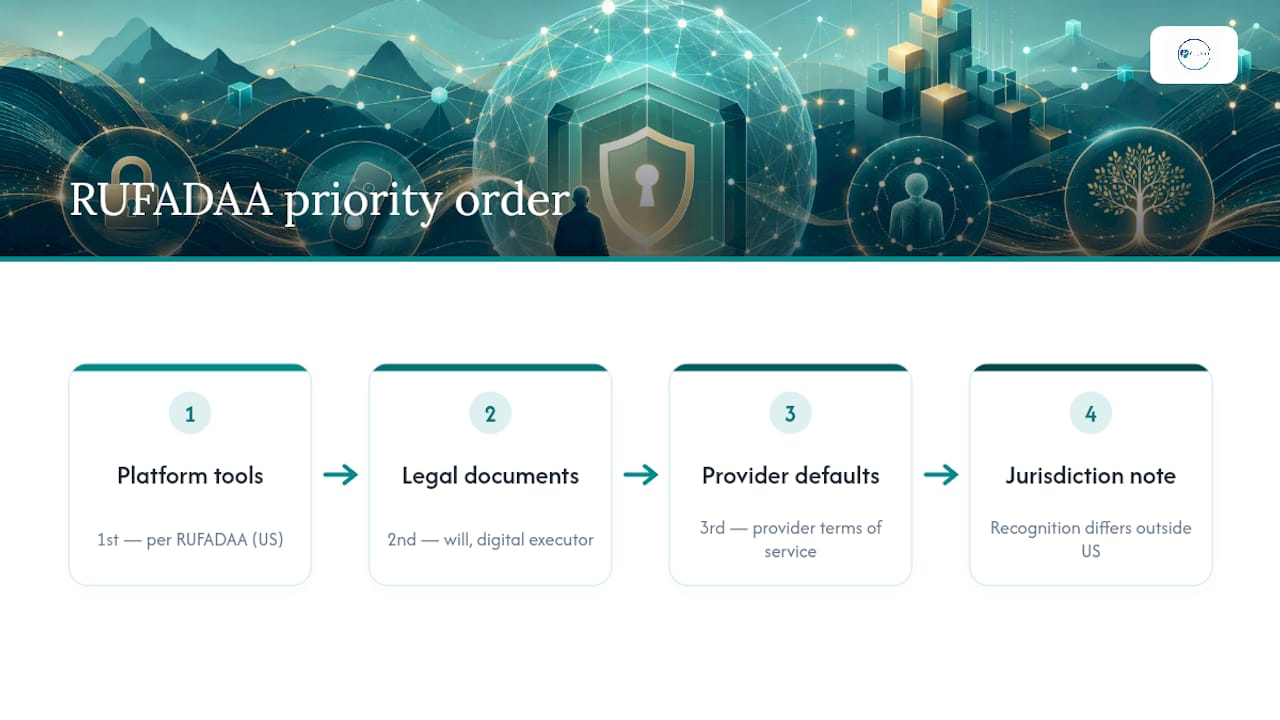
If you hold dual citizenship, own property abroad, or have close family in another country, a few practical adjustments help. Confirm whether your country of residence has adopted an equivalent to RUFADAA. Canada and the UK have their own frameworks that differ in scope and default priority. If you hold crypto on an exchange based outside the U.S., check its specific beneficiary or estate-access policy rather than assuming U.S. rules apply.
For most solo agers without significant cross-border complexity, U.S. platform tools and a properly referenced will cover the vast majority of cases. The complexity mainly shows up for foreign bank accounts, offshore business entities, and crypto held on non-U.S. exchanges, where a local estate attorney in that jurisdiction is worth the consultation fee.
Is It Ethical to Access Someone's Digital Life After They're Gone?
Reading someone's old messages, browsing their photo library, or logging into an account they never explicitly shared raises a real tension: you're honoring their wishes, but you're also seeing things they may never have intended anyone to see.
This is exactly why platform-level tools like Apple Legacy Contact and Google Inactive Account Manager matter so much. They let you define, while you're still here, exactly what becomes visible and to whom. Without that explicit consent built into the platform itself, an executor accessing your accounts is making judgment calls about privacy that were never theirs to make.
A few principles help here. Be specific in your instructions about what should be reviewed versus what should be deleted unread; a folder of private journal entries doesn't need to become required reading for your executor. Consider whether some accounts should simply be closed unopened rather than sorted through, especially anything containing sensitive health, financial, or personal content unrelated to settling your affairs. And recognize that your executor is doing emotional labor, not just administrative work; giving them narrow, clear permission protects both your privacy and their peace of mind.
The ethical bar isn't "give total access." It's "give exactly the access needed, and no more," which is precisely what a well-set legacy contact accomplishes better than a vague verbal request ever could.
Beyond Facebook: How Other Platforms Handle Memorialization
Facebook popularized the idea of a memorialized profile, but nearly every major platform now has its own version, and the differences matter.
Instagram mirrors Facebook's approach since Meta owns both; a memorialized account gets a "Remembering" label, and a legacy contact can manage limited settings without deleting the profile outright. LinkedIn takes a different route: family members can request either memorialization or full account closure by submitting a form with proof of death, but there's no legacy contact feature to pre-authorize anyone. X (formerly Twitter) allows account deactivation upon request from an authorized party but doesn't offer memorialization at all; the account is either active or gone.
TikTok has introduced a memorialization option that labels the account and restricts new content, but it's newer and less consistently applied than Facebook's system. Pinterest, Snapchat, and most smaller platforms currently offer no formal memorialization process at all, meaning closure typically requires a death certificate and a direct request to support.
The practical takeaway: don't assume every platform works like Facebook. Check each major account's specific policy, and note in your letter of instruction which ones you'd prefer memorialized versus simply closed. For platforms with no memorialization option, your executor will need the login itself, which is one more reason your password manager's emergency access setup matters more than any single platform's built-in tool.
How Do You Transfer Ownership of Digital Assets Without Losing Them?
Migration is where digital legacy plans quietly fail, usually because nobody accounted for renewal dates, licensing terms, or the difference between "access" and "ownership."
Domain names are the clearest example. A domain doesn't transfer automatically; someone with registrar access has to initiate the transfer before the renewal date lapses, or the site goes dark and can even get scooped up by a squatter once it expires. The same logic applies to paid software licenses, some of which are non-transferable by their own terms of service regardless of what a will says.
For monetized accounts like a YouTube channel or an Etsy shop, ownership transfer often requires the platform's own verification process, not just a login handoff. Build in time for that when you're documenting desired outcomes in your inventory. Cloud storage is comparatively simple: Apple and Google's legacy tools hand over content directly, but the account itself typically cannot be reassigned to someone else's name, only its contents extracted.
For crypto, migration means moving assets to a new wallet the beneficiary controls, using the seed phrase you've kept safe. This is a one-time event, not an ongoing access arrangement, which is part of why crypto instructions need to be exceptionally clear about timing and method.
The general principle: treat every asset differently depending on whether the plan is to preserve content, hand over full control, or shut it down. A single blanket instruction like "give my executor everything" tends to break down the moment it meets a platform's specific transfer rules.
What Happens If You Never Make a Digital Legacy Plan?
Nothing dramatic happens immediately, and that's part of the problem. Bills tied to auto-renewing subscriptions keep charging a card that's no longer being monitored. A monetized website or channel can lose ad revenue or get flagged for inactivity. Photos stored only in one cloud account become permanently unreachable once a provider's inactivity policy kicks in, often after the platform's default retention window closes with no legacy contact ever having been set.
The bigger risk is legal friction. Without a named digital executor or referenced letter of instruction, your family may need to petition a court for access, a process that can take months and cost real money in legal fees, particularly for assets with real value like crypto or a business account. Some platforms will simply refuse access altogether without a court order, even to a spouse, if RUFADAA-compliant legal authority was never established.
Cryptocurrency carries the sharpest risk of all: a seed phrase that exists only in your memory or on a device nobody else can unlock means those funds are gone permanently, with no customer service line to call and no court order that can retrieve a private key nobody wrote down. There is no recovery mechanism for lost crypto access; unlike a bank account, there's no institution to petition.
None of this requires an elaborate plan to avoid. Even the rough two-hour version covered earlier in this guide, an inventory, legacy contacts set, and a password manager with emergency access enabled, closes most of these gaps. The absence of a plan doesn't just risk sentimental loss. It risks real financial value and months of unnecessary legal complication for whoever is left sorting it out.
Setting Up My Plan Felt Like an Act of Independence, Not an Ending
Picture finishing your inventory on a Sunday afternoon, closing the laptop, and feeling something close to relief instead of dread. That's the moment this work is really about. Two things make it stick: keep your list of accounts somewhere your executor can actually find, and turn on your platform legacy contacts this week, not "someday." Planning this way isn't about bracing for an ending. It's proof you've built a full life worth protecting.
— Mike
How Aging Solo Can Help You Finish This Plan
If reading through five steps, three platform tools, and a letter of instruction feels like more than you want to tackle alone, that's exactly what a Solo Aging Clarity Session is for. This paid 45-minute Zoom consultation walks through your specific accounts, family situation, and any complicating factors like crypto or a small business, and helps you leave the call with a real plan instead of a half-finished spreadsheet. Most people come away with a clear list of what to do first and who should hold each piece of authority.
You don't need a consultation to get started, though. The Soloist's Toolkit has free templates for exactly the inventory and letter of instruction described above, and Elder Planning for Solo Agers covers how your digital plan fits into the rest of your estate strategy. Professional help isn't required for most straightforward accounts. But if you're managing crypto, a business, or property across more than one household, a session built around your specific setup often saves far more time than it costs. If that sounds useful, you can book a Solo Aging Clarity Session and walk through your plan with someone who does this work regularly.
Where to Learn More
A few primary sources are worth bookmarking directly. Purdue Global Law School's overview of digital estate planning explains RUFADAA's priority order in more legal detail than covered here. The Conversation's piece on digital legacies breaks down how platform access limits work in practice. Experian's guide to digital estate plans is a solid refresher on scope and definitions.
Sources
- What is a digital estate plan? | Experian
- Most of us will leave behind a large 'digital legacy' when we die — here's how to plan what happens to it | The Conversation
- Digital estate planning | Purdue Global Law School
- Digital legacy planning: how to pass on your accounts, photos, and crypto | AdvisorGuide
FAQ
What Is Digital Legacy Planning?
It's the process of organizing your online accounts, passwords, and digital assets, then giving a trusted person legal authority to manage, transfer, or close them after your death.
What Does "Digital Legacy" Actually Mean?
It refers to everything you leave behind online, from email and cloud photos to crypto wallets, domains, and subscription accounts, not just your social media profiles.
How Do I Actually Make a Digital Legacy Plan?
Start with a basic account inventory, set legacy contacts on Apple and Google, enable your password manager's emergency access, name a digital executor, and reference the plan in your will without listing actual passwords there.
What Does a Digital Executor or Professional Fiduciary Do?
A digital executor carries out your documented wishes for your online accounts; a licensed professional fiduciary can serve this role neutrally, which is often useful for solo agers without a nearby family member to take it on.
Should I Ever Put Passwords in My Will?
No. Wills often become part of the public probate record, so passwords belong in a password manager's emergency access feature or a sealed physical backup, never in the will itself.