

Seniors should review and update their emergency contacts at least once a year, and immediately after any major life change. Here are three things you can do right now, in under 10 minutes:
- Call your primary emergency contact to confirm their phone number is current and they still agree to the role.
- Update your phone's Medical ID (iPhone) or Personal Safety (Android) with the correct name and number.
- Print a wallet card or index card with your top two contacts and place a copy on your refrigerator.
Pro Tip: Where possible, name the same person as both your emergency contact and your healthcare proxy. When those roles are held by different people, make sure both know about each other and understand their separate responsibilities.
Key Takeaways
Seniors should review and update emergency contacts at least once a year, and immediately after any hospitalization, move, legal change, or shift in caregiver availability.
| Point | Details |
|---|---|
| Annual review is the baseline | Set a recurring calendar reminder tied to your birthday or annual physical to trigger the review. |
| Use layered storage | Keep contacts in your phone's Medical ID or Personal Safety, a printed wallet card, and a File of Life on your refrigerator. |
| Confirm, don't assume | Call each contact to verify their number and willingness; a listed contact who doesn't answer is no contact at all. |
| Align contacts with legal roles | Your emergency contact and healthcare proxy should either be the same person or know about each other's separate responsibilities. |
| Agingsolo supports the full plan | The Agingsolo emergency planning guide and Clarity Session help solo agers build a complete, reliable safety plan beyond the contact list. |
Table of Contents
- Why seniors update emergency contacts annually — and what happens when they don't
- Who belongs on your emergency contact list?
- When should you update your contacts?
- Where should you keep your emergency contact information?
- How to update your emergency contacts step by step
- How to align your contacts with your legal documents
- Your annual emergency contact review checklist
- Practical tips for caregivers helping with contact updates
- Common mistakes that make emergency contacts useless
- Trusted resources and tools for updating your contacts
- What the annual review really protects
- Agingsolo makes emergency planning straightforward
- Sources
- FAQ
Why seniors update emergency contacts annually — and what happens when they don't
Life moves faster than most contact lists do. A phone number changes. A close friend moves to another state. A sibling's health declines. A caregiver takes a new job. Any one of these shifts can turn a carefully chosen emergency contact into a dead end at the worst possible moment.
For older adults, the stakes are higher than for most. When a first responder, ER nurse, or hospital intake coordinator tries to reach someone on your behalf, they need a number that works and a person who picks up. Stale contacts slow that process, sometimes by hours.
After retirement, contacts tend to go stale faster. Moves, changing social circles, and evolving care needs all accelerate the drift between who you've listed and who can actually help. Preparedness experts generally recommend checking your list every 6–12 months, with more frequent reviews if your health situation is changing. The CPSC's older-adult safety guidance reinforces this kind of proactive planning as a core part of staying safe at home.
Outdated contacts don't just slow notification. They can delay medication decisions, complicate hospital admissions, and leave providers without the information they need to act. That's not a small inconvenience. For a solo ager, it can mean critical decisions get made without anyone who knows you in the room.
Who belongs on your emergency contact list?
Most people list one name and stop there. That's a fragile plan. A single contact can be unavailable, traveling, ill, or simply not answer. A layered list gives first responders and providers a real path to someone who can help.
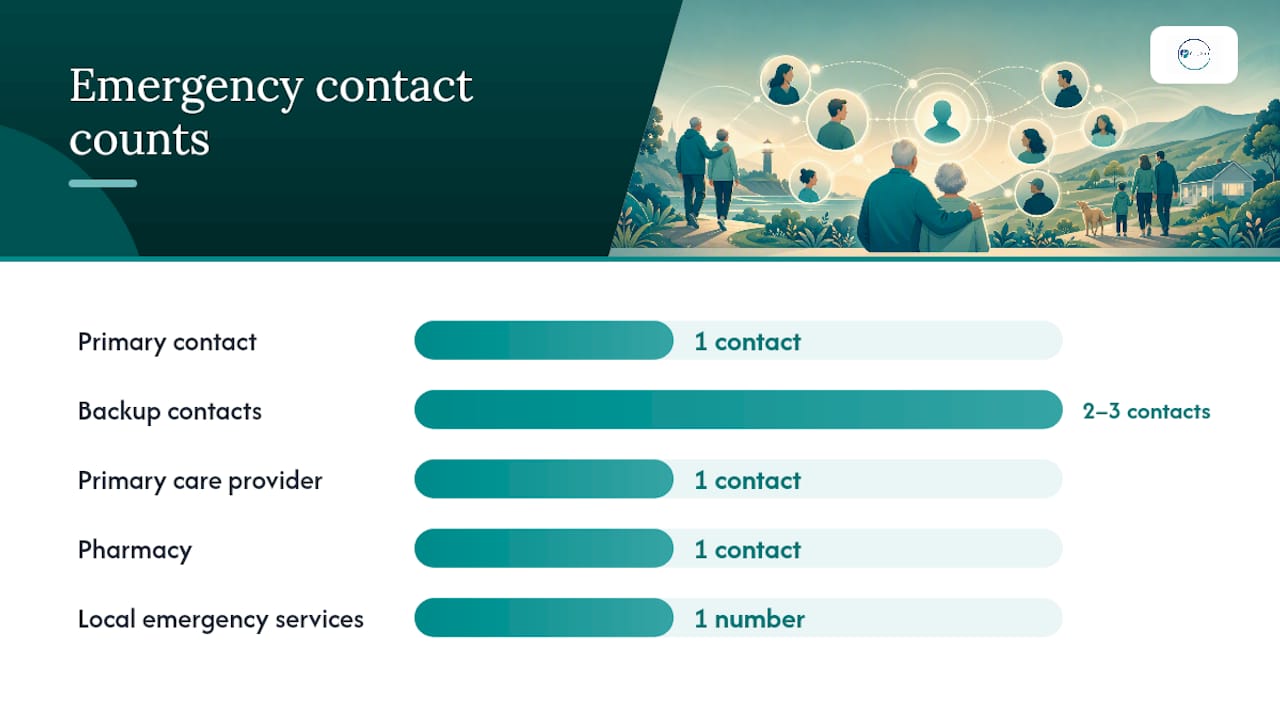
Here's the mix that works well for most seniors:
- Primary contact: The person most likely to be reachable and willing to act. Ideally, this is also your healthcare proxy or the person named in your medical power of attorney.
- Two to three backup contacts: People in different locations when possible. A local neighbor or friend is valuable for in-person response; an out-of-area family member is useful for broader coordination.
- Primary care provider: Name and office number, not just a general clinic line.
- Pharmacy: Your regular pharmacy's direct number, especially if you take multiple medications.
- Local emergency services: 911 is universal, but if you have a medical alert service or a local non-emergency line you use, include it.
Pro Tip: Before you list someone, ask them directly. An emergency contact who doesn't know they've been named, or who isn't prepared for the responsibility, creates risk. Confirm their willingness and make sure they know where your key documents are kept.
The legal piece matters here too. An emergency contact has no automatic authority to make medical decisions on your behalf. That power requires a separate legal document, a medical power of attorney or healthcare proxy. If your emergency contact and your healthcare proxy are different people, both need to know about each other. For a deeper look at setting up that legal layer, Agingsolo's guide on healthcare proxy for solo agers walks through the process clearly.
When should you update your contacts?
Once a year is the baseline. A good anchor date is your birthday, the start of a new year, or the date of your annual physical. Any of those creates a natural, repeatable habit.
But annual isn't always enough. Certain events should trigger an immediate review, regardless of when you last updated:
- A hospitalization or new diagnosis
- A new prescription regimen, especially one involving multiple medications
- A move, whether yours or your contact's
- A change in caregivers or home health support
- The death, serious illness, or relocation of a listed contact
- Any update to your legal documents (power of attorney, advance directive, healthcare proxy)
Preparedness guidance for dementia caregivers recommends quarterly light checks and deeper six-month reviews, a useful model for any senior whose health situation is actively changing.
Set a calendar reminder now. A recurring annual alert labeled "Emergency Contact Review" takes 30 seconds to create and removes the friction of remembering. Your health portal, if you use one, may also let you set reminders tied to your care plan.
Where should you keep your emergency contact information?
The goal is redundancy. No single storage method is foolproof, so a combination of digital and physical options gives first responders and providers the best chance of finding what they need quickly.
| Storage method | Best for | Key limitation |
|---|---|---|
| iPhone Medical ID | Lock-screen access without unlocking phone | Requires setup; useless if phone is dead or damaged |
| Android Personal Safety / Emergency Share | Location sharing + contact notification during incident | Requires Android setup; varies by device model |
| Printed wallet card | Always on your person; no power needed | Can be lost; needs manual updates |
| File of Life on refrigerator | First responders are trained to check there | Not portable; only useful at home |
| Patient portal (MyChart, etc.) | Accessible to providers; shareable with authorized viewers | Requires internet; not visible to first responders on scene |
| Medical ID jewelry | Visible to responders even if unconscious | Limited information capacity |
Johns Hopkins recommends keeping a printed emergency information form in places first responders check, specifically the wallet and the refrigerator. Phones can be locked, out of battery, or damaged in the same incident that requires emergency response. A printed backup is not old-fashioned; it's smart redundancy.
Mayo Clinic advises storing health information in patient portals or personal health records and keeping it updated so responders and clinicians can find it quickly. If you use a portal like MyChart or a similar system, add an authorized viewer so a trusted person can access your records if you're incapacitated.
Pro Tip: Use all three layers: phone Medical ID, a printed wallet card, and a File of Life on your refrigerator. Each one covers a scenario the others don't.
How to update your emergency contacts step by step
On iPhone (Medical ID and Emergency Contacts)
- Open the Health app on your iPhone.
- Tap your profile photo or initials in the top right corner.
- Select Medical ID.
- Tap Edit in the top right.
- Scroll to Emergency Contacts and tap the + button to add or update a contact.
- Add name, relationship, and phone number.
- Tap Done to save.
To verify lock-screen access: press the side button to wake your phone, then tap Emergency on the passcode screen. You should see "Medical ID" in the lower left corner.
For full setup guidance, visit Apple's Medical ID support page.
On Android (Personal Safety / Emergency Share)
- Open Settings and search for Personal Safety (or Safety & Emergency on some devices).
- Tap Emergency contacts and select Add contact.
- Choose a contact from your phone book or enter details manually.
- Enable Emergency sharing to allow the app to send your location and battery status to contacts during an emergency.
For Pixel phones, Google's Pixel safety setup guide covers Emergency SOS, Car Crash Detection, and how emergency sharing notifications are sent to your contacts.
For all Android devices, the full walkthrough is on Google's emergency help support page.
With your healthcare providers
- Primary care office: Call or send a message through your patient portal. Ask the front desk to update your emergency contact in your chart. Confirm they have the correct name, relationship, and phone number.
- Pharmacy: Call your pharmacy directly and ask them to update the emergency contact on your account. If you use a mail-order pharmacy, log in to your account online or call customer service.
- Hospital admissions: If you've been admitted recently, your records may still show an old contact. Call the hospital's patient services or medical records department and request an update.
Note: Adding annotated screenshots to this section in the published version will make these steps easier to follow for readers who are less familiar with phone settings.
How to align your contacts with your legal documents
Being listed as an emergency contact and being a legal decision-maker are two different things. This distinction matters enormously in a real emergency.
An emergency contact is the person providers call to notify or consult. They can share information and advocate informally. But they cannot legally consent to surgery, refuse treatment, or access medical records without your explicit authorization, unless they are also named in a medical power of attorney or healthcare proxy.
Here's how to close that gap:
- Review your legal documents. Pull out your medical power of attorney, healthcare proxy, and advance directive. Check who is named.
- Compare names. If your emergency contact and your healthcare agent are different people, that's not automatically a problem, but both need to know about each other and understand their separate roles.
- Give your agent a copy. Your healthcare proxy should have a signed copy of the document, not just know it exists.
- Tell your contacts what to do. Walk your primary contact through where your documents are kept, what your wishes are, and who else is involved.
- Update your providers. Make sure your doctor's office has your healthcare proxy on file, not just your emergency contact name.
For solo agers especially, aligning emergency contacts with legal roles before a crisis is one of the most protective steps you can take.
Your annual emergency contact review checklist
Use this checklist once a year, or after any major life change. Print it, or work through it on screen.
- Confirm primary contact's phone number by calling or texting them directly.
- Confirm backup contacts (2–3 people) are still reachable, willing, and aware of their role.
- Update iPhone Medical ID or Android Personal Safety with current names and numbers.
- Replace your printed wallet card if any information has changed.
- Refresh the File of Life on your refrigerator with updated contacts and medications.
- Log in to your patient portal and verify the emergency contact listed there.
- Call your pharmacy to confirm they have the right contact on file.
- Review your medications and allergy list and update it in your Medical ID and any printed forms.
- Check your legal documents (POA, healthcare proxy, advance directive) to confirm names and contact details are current.
- Set next year's reminder in your calendar before you close this checklist.
The ACL's "Just in Case" emergency preparedness form is a free, printable government resource that covers many of these same items and is worth keeping alongside your checklist.
Pro Tip: If you have a caregiver, neighbor, or trusted friend who helps you manage daily tasks, ask them to sit with you for the annual review. Two sets of eyes catch things one person misses, and it takes less than 30 minutes together.

Practical tips for caregivers helping with contact updates
Caregivers often do this work on behalf of someone else, which adds a layer of sensitivity. Here's what helps and what to avoid.
Do:
- Ask permission before changing any contact in someone else's records. Even a well-intentioned update without consent can damage trust.
- Confirm the senior's preferred primary contact directly with them, not just from memory.
- Test lock-screen access on their phone after updating Medical ID or Personal Safety to make sure it works.
- Keep a copy of the updated contact list yourself, so you have it if their phone is unavailable.
- For people with dementia, use a hybrid approach: phone Medical ID, printed File of Life, and shared access to an online portal. This layered method reduces single-point failures and is considered best practice by many dementia caregivers.
Don't:
- List yourself as the only contact if you're also the primary caregiver. You may be the one in the emergency with them.
- Assume a contact is still valid because it was correct last year. Always verify.
- Skip the conversation about legal roles. If the person you're caring for doesn't have a healthcare proxy in place, that's a gap worth addressing now, not during a crisis.
If you're caring for someone with a pet, Agingsolo's emergency pet care plan is a useful companion resource to include in the broader planning conversation.
Common mistakes that make emergency contacts useless
Getting a contact list in place feels like the hard part. Keeping it accurate is where most people fall short.
Common mistakes:
- Outdated phone numbers. A disconnected number is the most frequent failure point. Always call to verify, not just check the number visually.
- Listing someone without asking them. A contact who doesn't know they've been named may not answer an unknown hospital number, or may not know where your documents are.
- Mismatched legal authority. Listing a contact who has no legal decision-making power, while your actual healthcare proxy is unlisted, creates confusion and delay.
- Relying only on a locked phone. If your phone requires a passcode and Medical ID isn't set up, first responders cannot access your contacts.
- No local backup. An out-of-state family member can't drive over in 20 minutes. At least one contact should be geographically close.
Red flags to watch for during a review:
- A listed contact has passed away or is seriously ill.
- A contact has moved out of the area or changed their number.
- A contact's role in your life has changed significantly (estrangement, new caregiving demands of their own).
- Your legal documents name someone who is no longer in your life.
Quick fixes: Make a test call. Add a local alternate. Print a backup card. Align your legal documents with who you've listed. None of these take more than an hour, and each one closes a real gap.
Trusted resources and tools for updating your contacts
What the annual review really protects
Most people think of emergency contacts as a formality, something you fill in once and forget. That framing misses what's actually at stake.
For a solo ager, an accurate, current contact list is part of the safety net itself. It's the difference between a provider reaching someone who can help and leaving a voicemail on a disconnected number. It's the difference between your healthcare proxy being in the room when decisions are made and a stranger making calls based on incomplete information.
The annual review isn't just about updating a phone number. It's a moment to look honestly at who is in your life, who is willing and able to show up, and whether your legal documents still reflect your actual wishes. That kind of intentional check-in is exactly what living alone with real safety requires.
What I've seen, working with solo agers, is that the people who feel most at ease aren't the ones who have the most contacts listed. They're the ones who have had the conversation, confirmed the roles, and built a plan that actually holds up. That's a quieter kind of confidence, and it's worth the 30 minutes it takes to get there.
Agingsolo makes emergency planning straightforward
If you've worked through this checklist and realized your emergency plan has more gaps than you thought, you're not alone. Many solo agers find that the contact list is just the starting point, and the harder questions are about legal documents, support networks, and what happens if something goes wrong when no one is nearby.
Agingsolo's living-alone emergency planning guide gives you a practical, printable framework for building that full plan, including templates for contacts, medical information, and legal document checklists. For a more personalized approach, a 45-minute Solo Aging Clarity Session via Zoom lets you work through your specific situation with someone who understands what solo aging actually looks like. No generic advice. Just a focused conversation about your plan, your people, and your next steps.
Sources
- Get help during an emergency - Android - Google Support
- Emergency health information - Mayo Clinic
- Emergency information form - Johns Hopkins Medicine
FAQ
How often should emergency contacts be updated?
At minimum, once a year. Update immediately after any hospitalization, move, change in caregivers, or update to your legal documents.
How many emergency contacts should a senior have?
Three to five is a practical range: one primary contact, two to three backups in different locations, and key providers like your primary care physician and pharmacy.
What triggers the emergency contact feature on an iPhone?
On an iPhone, pressing the side button five times rapidly activates Emergency SOS. From the lock screen, tapping "Emergency" then "Medical ID" displays your emergency contacts and medical information without unlocking the phone, as described in Apple's Medical ID guide.
Does an emergency contact have the legal authority to make medical decisions?
No. An emergency contact can be notified and consulted, but cannot legally consent to or refuse treatment without a separate legal document, specifically a medical power of attorney or healthcare proxy, as Nolo explains.
How often should an emergency plan be reviewed overall?
A full emergency plan, including contacts, legal documents, medications, and storage locations, should be reviewed annually at minimum, with a lighter check after any significant life event.