

Alexa will call and text your designated emergency contacts the moment you say "Call for help," but it will not dial 911 directly through standard Alexa Calling. Getting actual dispatch access requires the paid Alexa Emergency Assist subscription, which routes your request to a trained Urgent Response agent who can contact emergency services and alert up to 25 saved contacts on your behalf. Setup itself takes about five minutes in the Alexa app. Add a contact under Communicate, confirm their mobile number is correct, and you are ready.
TL;DR:
- Alexa cannot call 911 directly through standard features; it only contacts your designated emergency contacts unless you subscribe to Emergency Assist.
- The Emergency Assist service costs extra and connects you to trained agents who can request emergency dispatch on your behalf, but only if your device stays online and permissions are current.
- Adding an emergency contact requires confirming a mobile number and checking that SMS and push notifications are enabled, as landlines cannot receive alerts.
- Regularly testing your setup with a trusted contact is crucial since outdated addresses or incorrect numbers can hinder emergency response efforts.
- A complete safety plan should combine Alexa's technology with physical resources, updated contact information, and a written emergency plan for the best protection.
Table of Contents
- What Alexa Can and Can't Do: 911, Alexa Calling, and Emergency Assist Explained
- How Do I Add or Remove an Alexa Emergency Contact?
- Is Alexa Emergency Assist Worth the Subscription?
- Practical Tips and Common Pitfalls to Avoid
- How Alexa Fits Into a Bigger Emergency Plan for Solo Agers
- A Small Test That Made My Week Better
- A Next Step If You Want More Than a Device
- Sources
- FAQ
What Alexa Can and Can't Do: 911, Alexa Calling, and Emergency Assist Explained
Here is the part that trips up almost everyone the first time: Alexa devices simply do not support direct calling to 911. When you say "Call for help" or a similar phrase, Alexa reaches out to the personal emergency contacts you have added in the app, not a dispatcher.
Standard emergency contacts work like a phone tree. Alexa calls and texts the person you have designated, and it is on them to decide whether to call 911 for you. Alexa Emergency Assist changes that equation. It is a paid subscription that connects you to a live, trained Urgent Response agent whose job is to gather details and request dispatch on your behalf. Hands-on explainers are clear that this service supplements 911. It is not a replacement, and no Alexa feature should be treated as one in a true emergency.
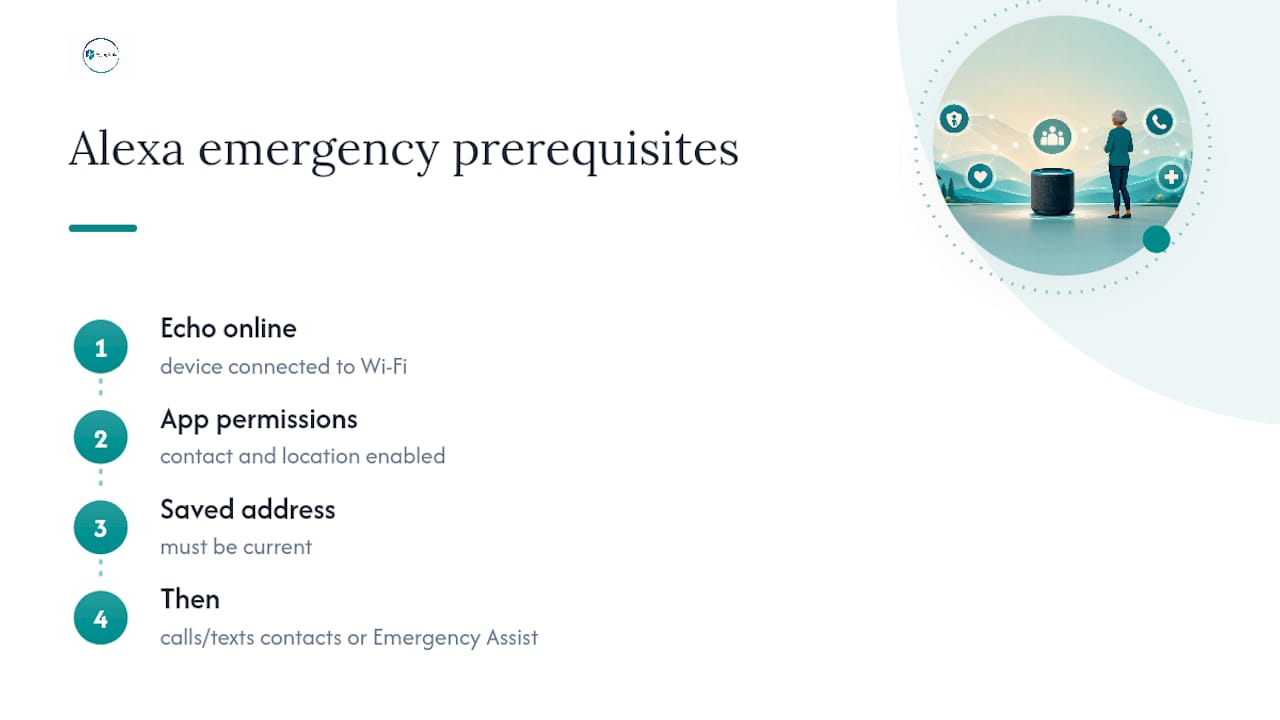
Both paths depend on the same backbone: your Echo device has to be online, the Alexa app needs contact and location permissions, and your saved address needs to be current. If your device drops off Wi-Fi, none of this works, regardless of which service you have.
How Do I Add or Remove an Alexa Emergency Contact?
Adding a contact is straightforward once you know the path, since it is buried a few menus deep. Here is exactly where to find it:
- Open the Alexa app and tap More in the bottom navigation.
- Select Communicate, then tap the Contacts icon.
- Tap the menu icon and choose Emergency Contact.
- Pick an existing contact or add a new one, then confirm the phone number.
- Save the entry. Alexa sends that person a text letting them know you have listed them as an emergency contact.
Removing a contact follows the same path. Tap into the Emergency Contact list, select the entry, and choose to remove it.
The phone number matters more than most people realize. Always use a mobile number, not a landline. Emergency notifications rely on SMS and push alerts, and a landline cannot receive either one. If your contact's number changes on their end, that update does not automatically sync into Alexa. You have to reopen the Alexa app yourself to pull the current number, a warning Amazon's own support documentation flags directly.
Contact mapping can also get messy if someone has multiple numbers saved in your phone under one name. Alexa may grab the wrong one. Open the entry after saving it and double check which number actually got attached.
Pro Tip: Right after you add someone, ask them to send you a quick text back confirming they got the notification. That thirty-second exchange tells you the whole chain, your phone, your Wi-Fi, and their number, actually works.
If anything seems off, the fix is almost always the same: reopen the Alexa app, confirm you are connected to Wi-Fi, and check that contact permissions are still turned on in your phone's settings.
Is Alexa Emergency Assist Worth the Subscription?
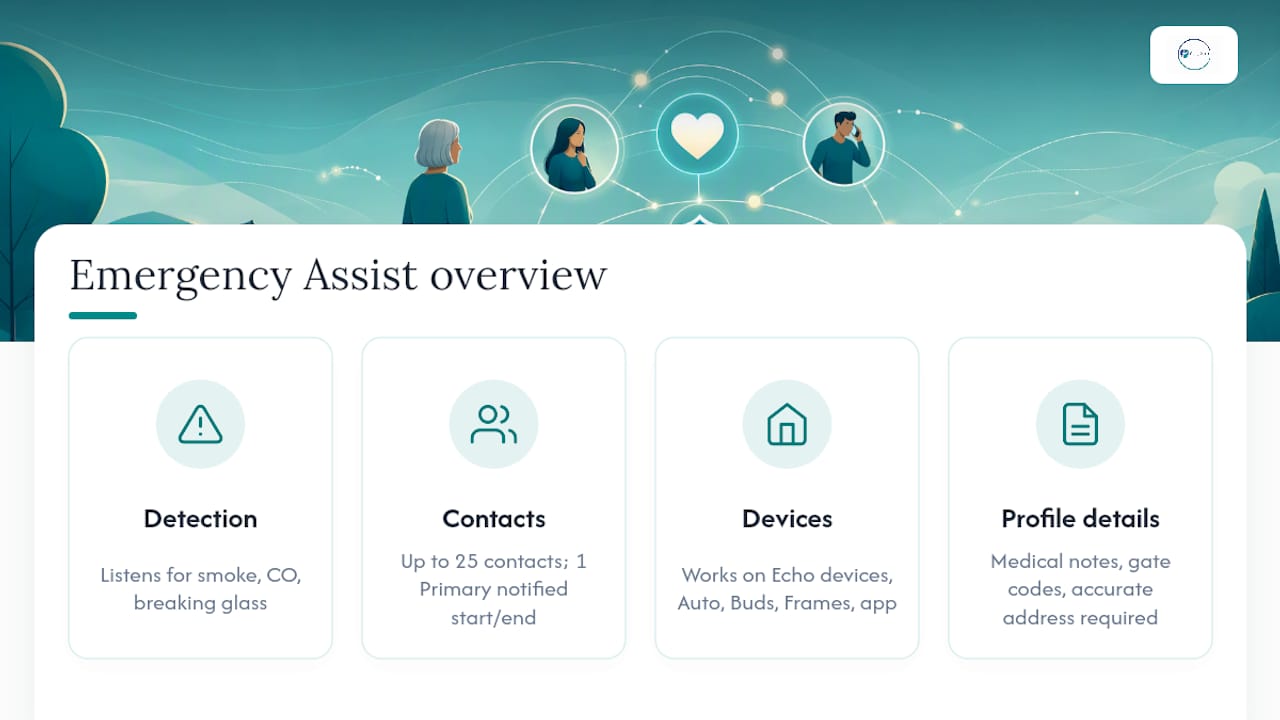
Alexa Emergency Assist is built for the moments when calling a friend is not enough. The service pairs your voice commands with proactive sound detection. It listens for smoke alarms, carbon monoxide alarms, and even the sound of breaking glass, then sends you a Smart Alert so you can respond or call Urgent Response directly from the app.
The mechanics are worth understanding before you sign up. You can list up to 25 emergency contacts, but only one of them can be your Primary Emergency Contact. That person gets notified when an Urgent Response call starts and again when it ends. If your primary contact does not answer, the agent can lean on the details in your profile and reach out to your other listed contacts instead. Choose someone who actually picks up their phone.
The service works across most current Echo devices, plus Echo Auto, Echo Buds, and Echo Frames, and it can also be triggered from the Alexa app itself if you are away from home.
Filling out your profile matters more than it seems. Medical notes, gate codes, and an accurate address give the Urgent Response agent something real to work with the moment they pick up. A saved address that is two years out of date is worse than no address at all, since it sends help to the wrong door.
Practical Tips and Common Pitfalls to Avoid
Most setup failures trace back to a handful of avoidable mistakes. A little attention now saves confusion later.
- Never name a contact "Help" or "Emergency" in your phone. Alexa's contact matching can misfire on generic labels and call the wrong person entirely.
- Confirm every emergency contact can actually receive SMS and push notifications. Landlines and numbers with carrier-level texting blocks will fail silently.
- Keep your saved address and medical notes current, especially after a move.
- Test the flow with a trusted contact who knows to expect the call. Never test this by dialing 911.
- Check that your Echo device stays connected to Wi-Fi and that the Alexa app has permission to use cellular data if you are away from home.
Pro Tip: Set a recurring reminder every six months to run a quick test call with your primary contact. Wi-Fi passwords change, phones get replaced, and numbers update, and Alexa will not catch any of that on its own.
How Alexa Fits Into a Bigger Emergency Plan for Solo Agers
Alexa is one layer, not the whole plan. The most resilient setup pairs your Emergency Contact list with a written plan you keep in multiple places: a digital copy, one in your wallet, and one on the fridge, the same three spots Aging Solo recommends in its emergency contact plan guide.
Layer it further with a neighbor or friend who has a spare key, an optional Emergency Assist subscription for sound detection, and a physical Medical ID you wear or carry. None of these replace each other. They cover different gaps. For the fuller picture on building that layered system, Aging Solo's living-alone planning guide walks through check-ins, backups, and documentation, and this piece on updating contacts annually explains why a once-a-year review matters more than people expect.
A Small Test That Made My Week Better
I called my sister to test my own Emergency Contact setup last month, half expecting an awkward "why are you calling me" moment. Instead we ended up on the phone for twenty minutes catching up on nothing in particular. That is the part nobody mentions: checking your safety net can turn into genuine connection. Add one contact today, confirm the number is right, and see what happens. For more ways to build a full, connected life on your own terms, resources like Aging Solo are helpful.
— Mike
A Next Step If You Want More Than a Device
Alexa handles the tech side of an emergency plan, but a full plan covers a lot more ground: who checks in on you, what your neighbors know, what happens if you are hospitalized for a week. Agingsolo built the 45-minute Clarity Session for exactly that gap. It is a live, one-on-one Zoom conversation focused on your specific living situation, not a generic template, so you leave with a plan that actually fits how you live alone now.
If you are aging alone and want a second set of eyes on your whole safety picture, not just your Echo device, consider booking a consultation to walk through it together.
Sources
- Alexa Emergency Assist: everything you need to know
- Add an Alexa Emergency Contact
- Can Alexa call 911? How to set up Alexa emergency contacts
FAQ
How Do I Add Emergency Contacts on Alexa?
Open the Alexa app, tap More, then Communicate, then the Contacts icon, then the menu button, and select Emergency Contact to add someone from your phone's contact list.
Can Alexa Be Used to Call Emergency Contacts?
Yes. Saying "Call for help" or a similar phrase tells Alexa to call and text the emergency contacts you have added, though it will not dial 911 directly without an Emergency Assist subscription.
How Much Does Alexa Emergency Assist Cost per Month?
Amazon does not publicly list a fixed monthly rate on its Emergency Assist overview page, so check the current pricing directly in the Alexa app or on Amazon's site before subscribing.
How Do I Set Up My Emergency Contacts?
Add at least one mobile number through the Alexa app's Emergency Contact menu, confirm the number is correct, and test the call with that person so you both know the system works.